

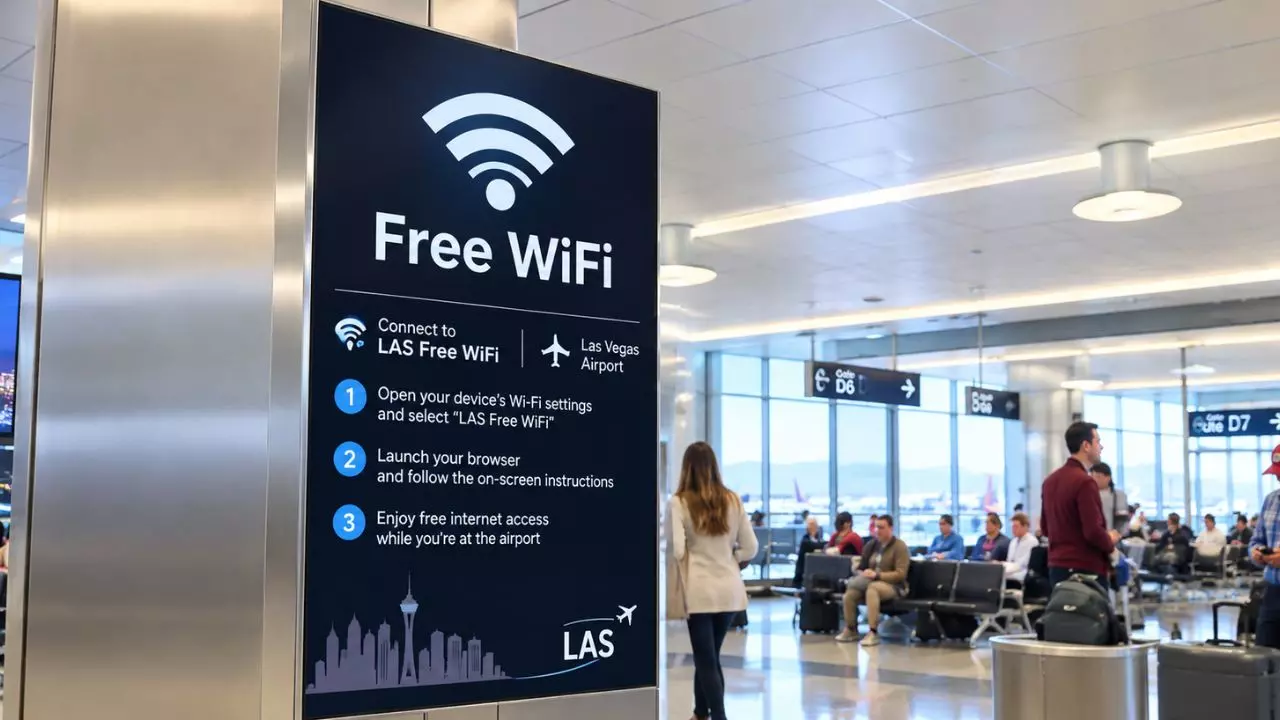
Harry Reid International Airport (LAS) provides free Wi-Fi in public areas, allowing passengers to stay connected while waiting for their flights or moving through the airport. They can connect their laptops, tablets, and smartphones to the LAS-WIFI network to check emails, browse websites, and stay in touch with family or colleagues.
Wi-Fi access is available throughout the terminals, including gate seating areas and other public spaces. Passengers using lounges can also use Wi-Fi service. When the airport network is unavailable, they can consider alternatives, such as prepaid SIM cards, travel eSIMs, pocket Wi-Fi, and international roaming.
Is WiFi Available at Harry Reid International Airport (LAS)?
LAS Airport provides free Wi-Fi service to assist passengers in staying connected. The service facilitates routine online tasks, such as accessing travel information, reading emails, and visiting websites.
|
Feature |
Details |
|
Network name |
LAS-WIFI |
|
Access |
Free |
|
Supported devices |
Tablets Laptops Smartphones |
|
Connecting process |
Choose the network and follow the steps displayed on the screen. |
|
Availability |
Public areas |
|
Usage |
Browsing Online travel facilities |
How to Connect to Wi-Fi at Harry Reid Airport?
Travelers should connect their devices to the LAS Airport wireless network and finish the on-screen sign-in procedure to gain access to free Wi-Fi.
-
Access the Wi-Fi settings on Wi-Fi-enabled devices.
-
Choose LAS-WIFI from the list of networks that are accessible.
-
When the sign-in page does not show up automatically, launch a web browser.
-
If prompted, adhere to the page's instructions and accept the terms of use.
-
After connecting, use the internet to:
-
Browse websites
-
Check emails
-
Get travel-related information
Note: Once connected, passengers can check Las Vegas Airport TSA wait times and flight information.
Connect Using Device
-
On iPhone: On an iPhone, pick LAS-Wi-Fi after opening Settings and tapping Wi-Fi. To finish the connection, follow any on-screen directions.
-
On Android: Go to Settings, choose Network & Internet, and then Wi-Fi. If prompted, select LAS-WIFI and open the sign-in notification.
-
Using a Laptop: To finish any necessary sign-in procedures, open the Wi-Fi menu, choose LAS-WIFI, and open a browser.
Which Lounges at LAS Airport have Wi-Fi Connection?
Wi-Fi is one of the amenities offered in the following lounges at Harry Reid International Airport:
|
Lounge |
Location |
|
Capital One Lounge |
Concourse D |
|
Chase Sapphire Lounge by the Club |
Near Gate C23 |
|
United Club |
Concourse D |
|
The Club LAS |
D Gates E Gates, near E2 |
Where is Wi-Fi Located at Las Vegas Airport?
Passengers can stay connected while waiting for flights or navigating the LAS Airport with its Wi-Fi services. It is provided in public places throughout the airport terminals. Travelers can use the service in the following primary locations:
-
Terminal 1: Public areas and gate seating near A, B, C, and D Gates.
-
Terminal 3: Public areas and seating near the E Gates.
-
Ticketing and check-in areas
-
Restaurants, cafes, and retail shops
-
Departure gate waiting areas
-
Baggage claim areas
-
Passenger walkways and terminal corridors
-
Lounges
-
Public areas near ground transportation services
What are the Alternatives to the Las Vegas Airport Wi-Fi for High-Speed Internet?
There are alternatives to the free Wi-Fi available at Las Vegas Airport for those who require a more private or dependable internet connection. While traveling throughout Las Vegas, these are useful for streaming, video chats, remote work, and internet access.
Travel eSIM
Mobile data is provided by a travel eSIM without the need for a real SIM card. Before landing in Las Vegas, visitors can buy a U.S. data package and set it up on a compatible phone. Verify that the device satisfies the provider's activation requirements, is carrier-unlocked, and supports eSIM technology.
Pocket Wi-Fi
A portable hotspot that connects to a cellular network and shares the connection with several devices is called pocket Wi-Fi. Families, organizations, and tourists with laptops and tablets may find it helpful. Before passengers go, find out about the provider's coverage in Las Vegas, data restrictions, battery life, and rental or purchase prices.
Physical SIM Card
Mobile data is provided via a local cellular network by a prepaid SIM card in the United States. Travelers whose phones are unlocked for use with a different carrier and accept physical SIM cards can use this option. Before buying a SIM, compare data allotments, coverage, plan validity, and activation criteria.
International Roaming
Travelers can use their current SIM card and mobile number in the United States with international roaming. To confirm U.S. coverage, roaming packages, data restrictions, and fees, get in touch with the mobile operator prior to the trip. This solution can be more expensive if travelers do not have a compatible international plan, but it eliminates switching SIM cards.
What Should You Do When LAS Wi-Fi Is Not Working?
Check the device's settings and reconnect to the airport network if Las Vegas Airport free Wi-Fi stops functioning. To fix typical connection issues, take the following actions:
-
Wi-Fi should be turned off, turned back on, and then the airport network should be selected once more.
-
To access the login page, open the browser and try going to a website.
-
Make sure Wi-Fi is turned on and airplane mode is off.
-
While finishing the login procedure, temporarily disconnect the VPN since it can interfere with the sign-in page.
-
If the signal is poor, try reconnecting from a nearby public seating area.
-
When the connection is still not working, restart the laptop, tablet, or phone.
-
Use cellular data or turn on a personal hotspot if passengers require instant access to the internet.
At Las Vegas Airport, Wi-Fi keeps travelers connected. They can use the free network to manage different activities. Mobile data, travel eSIMs, and international roaming are useful substitutes for unreliable internet access or connection problems.
Comments 0
No comments yet. Be the first to share your experience.